


Adobe CS4 Preview
 The new Adobe CS4 is looking pretty slick.
The official release date for Creative Suite 4 has not yet been announced, but a solid prediction has it scheduled for release in early 2009. In the past, Create Suite releases have had an 18 to 24 development cycle with the last version CS3 having been released in March of 2007.
With the upcoming release, Adobe has enabled free access to download a 48 hour beta test of Dreamweaver, Fireworks, and Soundbooth. Meanwhile, if you own a CS3 license you can continue to use them until they are replaced by the official versions.
The predecessor, Adobe CS3, introduced a healthy upgrade but was criticized for a lack of progress on certain apps including Dreamweaver and Fireworks. Being this was the second Creative Suite release since Adobe's acquisition of Macromedia, some of us expected a lot more out of Dreamweaver & Fireworks yet there was little noticeable differences between CS2 and CS3.
Now, for the first time, it appears that the former Macromedia apps really do fit in with the Adobe family.
Rest assured, in CS4 Adobe has finally committed significant development progress for both of these programs. And the trend continues for integration between all Creative Suite for a smoother, more efficient workflow.

Dreamweaver CS4 has an updated interface and some killer new features.
First thing you'll notice by loading up the new Dreamweaver is the new color theme. Adobe has transitioned the presentation of their interface to a subtle palette of gray. The idea here is to improve focus on your actual work by removing distractions and making the interface as subtle as can be. I was wrote this article in the new Dreamweaver and I must say, the new interface is executed beautifully.
Related Files Bar
Now in the top shelf, a new row has been added which conveniently features any files which are linked to you're current document. Making it easy to see all of related files such as the style sheet, PHP includes, or external scripts. This small new addition allows you to quickly access these files without having to tediously find them in the browser panel each time.
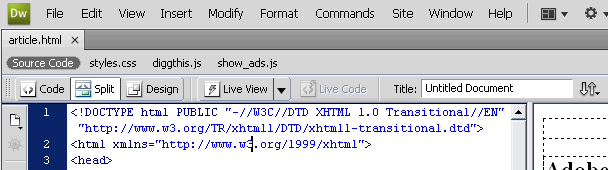 Above: A new Related Files toolbar allows for quick access to any files connected to your document.
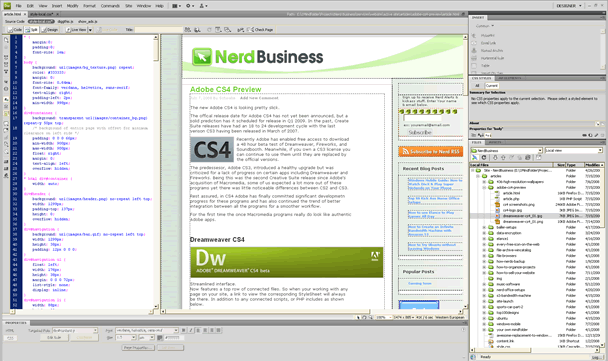
Vertical Split Screen Code & Design View
Now when viewing code documents in Split Screen you can change the alignment to vertical. This is hugely useful particularly those of us with massive LCD screens. In previous versions of Dreamweaver the Split Screen mode was essentially pointless. This new vertical split may easily be one of the best new features of Dreamweaver CS4. Hey, sometimes it's the simple things that matter most!
Live View
Adobe has introduced a new feature called Live View which is like having a built in web browser right in Dreamweaver. It uses the WebKit rendering engine used by Safari and other web browsers.
In Live View, the first thing you'll try to do is to edit your page. How cool would that be, to be able to edit your page in a web browser! And you'll quckly be met with disappointment. Unfortunately, Live View is read only. Which essentially makes it pointless because you might as well test your page in a real browser.
One other "Live" feature that IS cool is the Live Code. This will show you what your code looks like at rendertime. Again, you could use a real web browser to do this (in Firefox the shortcut is CTRL-U ) yet it is incredibly useful to be able to quickly jump back and forth while in Dreamweaver.
With Live View & Live Code enabled, you can you can freeze Javascript in order to see changing states in your output code more effectively. It's a neat feature because it's like being able to pause your web browser as it renders your code in different states.
Dataset Wizard
This is a sweet feature that allows you to pull data from XML or an HTML file and make a sort of static database. Perfect for database noobs! You just need a source file with something like an HTML table and the wizard will guide you through the steps to bind the data and create the output for you.
Javascript and AJAX
Dreamweaver CS4 now includes some added Javascript support. New code hints within Code View make it easy to see Javascript variables. And a new Javascript Extractor will take any Javascript within your HTML page and move it to a separate Javascript file.

Fireworks CS4 has a fresh new look! Much more "Adobe" feeling, it now has a consistent interface with all of the other CS4 products.
Any concerns about Adobe giving the potential axe to Fireworks have been put to rest as this program in particular has received some really cool new features and integrations.
There have been a lot of changes in Fireworks CS4 both in the visual interface and functionality.
Commands Menu
In Fireworks CS4 you'll be probably using the Commands menu a whole lot more. Not only because some useful new commands are included like the Auto Vector Mask or Take Screenshot but because this is also where most of any downloaded extensions you find will go.
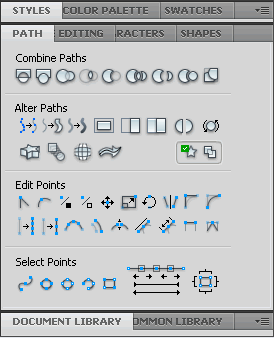
Panel Updates
Pretty much any existing Panel from the previous Fireworks has been updated in CS4. Now panels are much more useful (and sexy).
Measure Tool
The new vector Measure Tool is a welcomed feature to those of us using Fireworks for web page concepting. Now you can quickly get a pixel precise measurements, which is perfect for referencing CSS values.
Text In A Path
This feature allows you to set Text to follow the inner contour of a vector shape. A very handy feature for web designers to get text to flow around an object, such as a photograph. All the while keeping the text AND the shape of the box editable. Heck, with this you can even get a paragraph to flow in the shape of a circle.
And more!
I'm still learning all of the new features in Fireworks CS4. One thing is for certain, I'm loving it and looking forward to the final release. Other new additions include a New Preferences settings, a Photoshop import dialog box, real time gradient manipulation, better functionality for the Pages panel, and subtle new measurement tools that automatically aid you as you are positioning elements around your document.


