


How to Burn a CD with Songbird
Songbird is a kickass open source music player with lot's of potential.
Yet you cannot burn a CD with Songbird (as of 0.7)... so in this brief tutorial I'm going to explain a simple workaround.
And the best part is, you can still build your playlist within Songbird. This method involves exporting your Songbird playlist - then opening that exported playlist with Windows Media Player, and then having Media Player take care of burning the CD.
Once you're setup with the Songbird playlist export extension - the process of burning a CD will be such a snap for you that you won't care when Songbird has it's own built-in CD burning functionality.
Sure, when an extension or the feature is finally included in an official release - that will be the way to go - but in the meantime follow the steps below:
Step 1: Download the Playlist Exporter Add-On
In the Songbird menu select Tools > Add-Ons...
From the Add-Ons start page, use the search box to type "playlist"
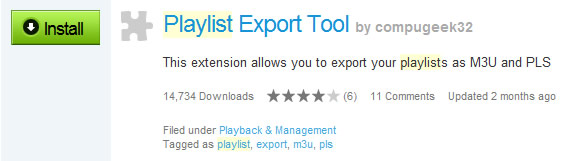
You'll quickly find the Playlist Export Tool. Install it and restart Songbird.
Step 2: Build your playlist
Add the songs you want on the CD to a custom playlist. On a related note, there is a great playlist Add-On called Now Playing List.
Step 3: Export your playlist
Once you have a satisfying playlist, choose File > Export Playlist from the Songbird menu.
In the next screen, open the Preferences and ensure that the M3U playlist type is selected.
Then, simply checkmark the name of your playlist and press Export Playlist.
Step 4: Open with Windows Media Player
Open your newly exported playlist in Windows Media Player. Then open the Burn menu and simply drag all of the tracks into the queue.
Step 5: Burn the Disc
Huzzah!


